Garmin Pilot
- 2.7
- Rating
- 500.00K
- Installs
- Free
- Price

 Analysis by App-foxy
When I first opened Garmin Pilot, I immediately understood that it was not designed as a casual weather app for checking whether I should carry an umbrella. It is an aviation-focused planning tool from Garmin, built for pilots who need more context than a simple temperature forecast. The app places weather inside a wider flight-preparation workflow, which makes it much more specialized than the usual weather apps found on Android.
That specialization is both its biggest strength and its biggest warning sign. If I am planning a flight, I want information organized around aviation decisions rather than a general city forecast. If I only want tomorrow’s rain chance, this is far more app than I need. My overall impression is that Garmin Pilot is most useful when treated as part of a pilot’s preparation routine, not as an everyday replacement for a mainstream weather service.
How Garmin Pilot feels in its current form
The app is listed as free, and it carries an Everyone age rating, but those two details should not make it sound like a lightweight recreational download. Garmin Pilot is an aviation app developed by Garmin, and its purpose is reflected in the way it approaches weather and flight information. The store describes it as a comprehensive suite of aviation tools for Android, and that positioning makes sense once you move beyond the first screen.
You May Also Like

 Blood Strike: 2.5 Anniversary
Blood Strike’s Loadouts Turn Every Drop Into a Tactical Gamble
A close look at Blood Strike’s custom loadouts: how fast access to signature weapons reshapes its battle royale rhythm, rewards preparation, and narrows the gap between fights.

 Pandora - Music & Podcasts
Pandora’s Music Is Easy to Start, but Harder to Recover
Pandora’s strength is its low-effort path from a seed to a station. Its weak spot is how much confidence it asks you to place in connection, setup, and quiet recovery.

 8 Ball Pool
 Is Built on Rivalries, Rematches, and Routine
A close look at the rivalries, rematches, shared routines, and unanswered safety questions that turn a quick pool match into a persistent mobile community.

 Samsung Music
’s Quiet Strength Is Playing What You Already Own
Its reach comes less from spectacle than from dependable access to a personal library. That simplicity is both the app’s strongest retention engine and its ceiling.

 AccuWeather: Weather Radar
AccuWeather Review: A Quick, Clear Forecast for Everyday Decisions
For everyday plans, the best forecast is the one you can understand quickly. AccuWeather makes rain timing, radar, and local conditions easy to act on, with a few trade-offs.

 Hill Climb Racing
Why Hill Climb Racing Still Turns Crashes Into One More Run
A tiny car, a bumpy hill and one more upgrade: Hill Climb Racing keeps resurfacing because its simple chaos makes every near-miss feel personal.
More From Our News Desk



I found the interface more practical than decorative. It is not trying to entertain me with animated backgrounds or lifestyle recommendations. Instead, the experience is centered on making aviation information available in a form that can support planning, checking conditions, and making more informed decisions before departure. That focus can feel dense at first, especially if I am used to apps that show one large forecast card and little else.
The current version is 26.2.0, which gives the app the feel of a mature product rather than a brand-new experiment. It has been available since March 27, 2012, and that long history matters here. Aviation software benefits from continuity because pilots often prefer familiar workflows, predictable terminology, and tools that do not radically change every few months. At the same time, an older product needs to keep its interface understandable for people who are joining the platform today.
Garmin Pilot has reached over 500 thousand installs, while its average rating sits at 2.7 from roughly 2.6 thousand ratings. I would not ignore that rating, but I also would not judge the app in the same way I judge a simple consumer forecast. A specialized aviation tool can attract users with very different expectations, device setups, and experience levels. Still, the score is a useful reminder that the app may involve friction that is not obvious from its professional positioning.
A weather tool built around aviation decisions
The most important difference from a normal weather app is the context. A standard forecast app usually answers questions such as whether it will rain in a neighborhood, how hot it will be at lunchtime, or whether the wind will be uncomfortable on a walk. Garmin Pilot is aimed at questions that arise before and during flight preparation: whether conditions deserve closer attention, how weather information fits into a route, and whether a forecast should change the way I approach a planned trip.
That makes it useful for pilots who already know what aviation weather information they need. The app is less forgiving for someone who expects the software to explain every term from the beginning. I would be comfortable recommending it to a student pilot working with an instructor, an experienced recreational pilot, or someone who wants a dedicated aviation planning environment. I would be more cautious about recommending it as a first and only weather reference for a complete beginner.
One practical advantage is that it encourages me to look at weather as a connected planning problem rather than an isolated number. Wind, visibility, cloud conditions, and changing conditions can affect different parts of a flight in different ways. Even when I am only preparing for a short trip, the aviation context pushes me to ask better questions than “does the icon show sun or rain?” That is a meaningful improvement over relying on a general forecast alone.
What the long-running product tells me about its evolution
The release history suggests a product that has had time to develop around aviation users rather than being assembled as a quick mobile utility. The current 26.2.0 version is the clearest verified sign of its present state, but I would avoid assuming that a version number automatically means a completely redesigned experience. In my view, the more relevant point is that Garmin continues to maintain a specialized tool whose value depends on dependable workflows and aviation-specific organization.
For an existing user, that kind of evolution can be preferable to constant visual change. A pilot who has already learned where important information lives may value stability more than a fashionable redesign. The trade-off is that newcomers may encounter screens that feel less immediately obvious than the polished, simplified layouts used by consumer weather apps.
I also see the app’s age as a reason to separate current evidence from future expectations. The present version tells me that the product is actively represented in the current Android ecosystem, but it does not guarantee that every future update will solve every usability complaint. I would install it based on the workflow it offers now, not on the assumption that a later update will add a feature I personally need.
Where it fits in a real pilot’s routine
A realistic use case would be a weekend pilot preparing for a morning flight. I would begin by checking the broad weather picture, then narrow my attention to the conditions that could affect departure, the route, and arrival. Instead of opening a general weather app, a separate aviation information source, and a notes app in an improvised sequence, I would use Garmin Pilot as the central place for the aviation side of that preparation.
The useful habit is not simply opening the app once and accepting the first forecast. I would check it at more than one point before departure, especially if the flight depends on a narrow weather window. That workflow helps reveal whether the plan is stable or whether conditions are changing enough to justify delaying, rerouting, or asking for another briefing. The app cannot make the decision for me, but it can make the decision process more deliberate.
A less obvious benefit is that a dedicated aviation environment can reduce the temptation to overvalue attractive consumer graphics. A general app may make a forecast feel reassuring because the screen is clean and the icons are easy to read. Garmin Pilot encourages a more serious reading of the information. For me, that is valuable when I am tempted to treat a broad “mostly clear” label as sufficient evidence for a flight decision.
Another useful workflow is to use it as a preparation checklist rather than a last-minute glance. I would review the weather before packing, revisit it while checking the aircraft and route, and then compare the latest information with my personal limits. This approach is more disciplined than opening any weather app at the airport and hoping the conditions look acceptable. The app earns its place when it becomes part of a repeatable routine.
Who will get the most from it
Garmin Pilot is a strong candidate for pilots who want aviation information presented in a dedicated mobile environment. It is especially suitable for people who already understand basic flight-planning concepts and want their weather checks to happen alongside other aviation tasks. The app also makes sense for users who already prefer Garmin’s ecosystem and appreciate having a familiar developer behind a specialized tool.
It may also help instructors and students during lessons, provided both people agree on how the app should be used. A student can learn not only where to find information, but also how to build a consistent preflight review. The important distinction is that the app should support instruction and sound judgment, not replace them. A new pilot should not treat a convenient screen as permission to ignore official briefings, aircraft limitations, or instructor guidance.
I would skip it if my needs are limited to local weather, hourly temperatures, pollen, or a quick rain alert. A mainstream weather app will usually be faster for those tasks and easier for family members or passengers who simply want to know what the day feels like. Garmin Pilot is not automatically better because it is more specialized; it is better only when the aviation context is genuinely useful.
I would also hesitate if I wanted a completely effortless first-time experience. The app’s professional scope means I need to spend time learning how it organizes information. That learning curve can be worthwhile, but casual users may see it as unnecessary work. The right question is not whether the app has many tools, but whether I will use enough of them to justify the extra complexity.
Important trade-offs before relying on it
The first trade-off is breadth versus simplicity. A comprehensive aviation suite can save me from switching between several sources, but it can also make the first few sessions feel crowded. I would recommend exploring it when I am not under time pressure, ideally before an actual flight day. Learning the layout at the gate or on the ramp is a poor way to discover where important information lives.
The second trade-off is cost structure. The app itself is free to install, but in-app purchases are listed from $74.99 to $109.99 per item. That is a significant consideration, particularly for someone who downloads it expecting a fully free weather tool. Before building a routine around it, I would examine which functions are included in the free experience and which require a purchase. The price range makes it especially important to match the app’s paid capabilities to real flying needs rather than buying out of curiosity.
The third trade-off is trust. A specialized interface can improve organization, but it does not remove the need for cross-checking. I would still compare important information with the sources and procedures required for my operation. Garmin Pilot can make preparation more efficient, yet efficiency should not become a reason to shorten a proper briefing or overlook a developing weather issue.
The rating also deserves a practical interpretation. A 2.7 average from around 2.6 thousand ratings is not a strong public signal, so I would test the app carefully on my own device before committing to any paid option. Android hardware, screen size, connectivity, and personal expectations can all influence the experience. I would pay attention to whether the navigation feels clear, whether the information appears in the places I expect, and whether the workflow fits my actual flying habits.
Questions I would answer before installing
If I were asking whether it works for ordinary weather checks, my answer would be yes in the broadest sense, but it would not be my first recommendation. The app is designed around aviation, so using it for a daily commute forecast would be like using a flight planning notebook to decide whether to take a jacket. It can be done, but the specialized format is not the most efficient choice.
If I were asking whether a beginner can use it, I would say that a beginner can start with it, but should not learn aviation weather from the app alone. The terminology and organization will make more sense with an instructor, a flight school, or an established training resource. I would use it as a visual and practical aid while learning, not as an authority that replaces formal instruction.
If I were asking whether the free installation means everything is free, I would be careful. The app is free to download, while optional purchases range from $74.99 to $109.99 per item. That difference matters enough that I would review the purchase choices before relying on the app for a complete workflow. A user who only wants to explore may be satisfied without spending, while a frequent pilot may need to evaluate the paid tools more seriously.
If I were asking whether it can replace every other source, I would say no. Its value is in bringing aviation tools together, not in making responsible pilots stop checking the information and procedures appropriate to their operation. I would use it as an important part of preparation, while keeping the required official and operational checks in place.
If I were asking whether the current release is worth trying for an existing Garmin user, I would say it is worth evaluating, especially if the aviation workflow matches what that person already wants. The current version shows a maintained product, but the public rating suggests that expectations should remain realistic. I would try the core workflow first, then decide whether the organization and available tools save enough time to justify continued use.
What I would watch in future updates
For future development, I would watch usability before chasing additional complexity. The app already aims at a broad aviation role, so the most valuable improvement would be making that breadth easier to navigate for both experienced pilots and newcomers. Clearer onboarding, better explanations of unfamiliar areas, and a smoother path from first launch to a repeatable preflight routine would make the product more approachable without weakening its professional focus.
I would also watch how Garmin balances existing-user familiarity with modern Android expectations. Long-term users may appreciate stable navigation, while new users expect quick access, readable layouts, and fewer moments of uncertainty. The best update would preserve established workflows while making the first hour with the app less intimidating.
Pricing and the relationship between the free app and its in-app purchases are another area I would monitor. At the listed purchase range, transparency becomes part of the user experience. Pilots should be able to understand which part of the workflow they can test freely and what a paid commitment adds before they make a decision.
Finally, I would watch whether the app continues to feel like one coherent aviation workspace rather than a collection of separate tools. Its promise is strongest when weather information, planning habits, and flight preparation reinforce one another. If the experience becomes too fragmented, the advantage over combining a normal weather app with other aviation resources becomes smaller.
My recommendation
My recommendation is fairly specific: install Garmin Pilot if you are a pilot or aviation student who wants a dedicated mobile planning environment and is willing to learn a more specialized interface. Give yourself time to explore it before using it for an important flight, and check the purchase options carefully because the free download does not tell the whole cost story.
For everyday weather, I would choose a simpler alternative. For aviation preparation, Garmin Pilot has a clear reason to exist, and its long-running presence and current 26.2.0 release show that it is not a throwaway utility. I would not ignore the 2.7 average rating, but I would treat it as a prompt to test the workflow personally rather than as an automatic rejection.
In the end, Garmin Pilot works best when I use it as a serious planning companion, not a general forecast widget. Its strongest quality is the aviation perspective; its main weaknesses are the learning curve, the potentially substantial purchase cost, and the need to keep personal judgment and proper briefing procedures in charge. For the right user, that trade-off is reasonable. For everyone else, a conventional weather app will be quicker, clearer, and better suited to the job.
FAQs for Garmin Pilot
01What features does Garmin Pilot offer for flight planning?
Garmin Pilot provides a comprehensive suite of features for flight planning, including interactive maps, weather overlays, and flight plan filing. Users can also access real-time weather updates, traffic alerts, and navigation tools. The app integrates seamlessly with Garmin avionics, offering a streamlined experience for pilots looking to manage their flights efficiently.
02Is Garmin Pilot compatible with both Android and iOS devices?
Yes, Garmin Pilot is available for both Android and iOS platforms. The app is designed to work seamlessly across different devices, providing a consistent user experience. However, it's advisable to check the specific system requirements for your device to ensure optimal performance and access to all features.
03Does Garmin Pilot offer real-time weather information?
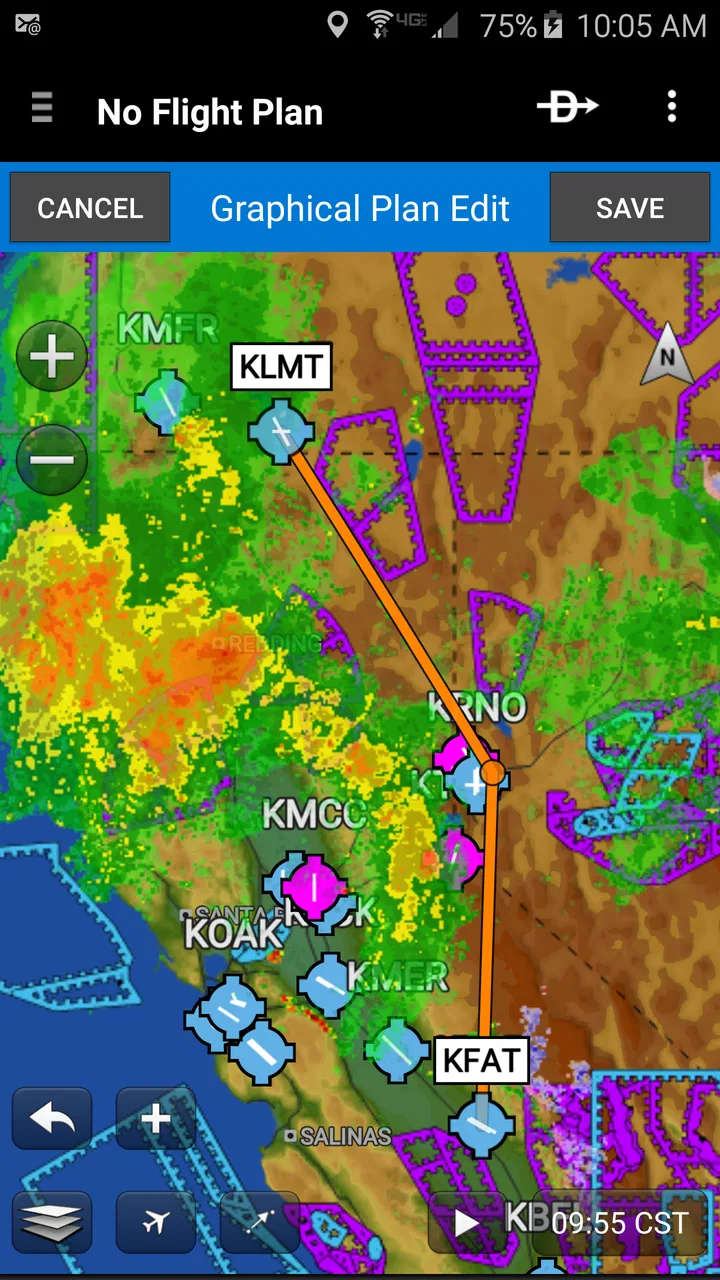
Garmin Pilot provides extensive real-time weather information, including METARs, TAFs, and weather radar. The app also features NEXRAD radar, lightning, and turbulence overlays to help pilots plan flights more safely. This information is crucial for understanding current conditions and making informed decisions during flight planning and execution.
04Can Garmin Pilot be used for IFR and VFR flights?
Yes, Garmin Pilot is suitable for both IFR (Instrument Flight Rules) and VFR (Visual Flight Rules) flights. It offers tools for flight planning, navigation, and weather monitoring that are essential for both types of flying. The app includes features such as charts, plates, and navigation data that support various flight operations.
05How does Garmin Pilot integrate with Garmin avionics?
Garmin Pilot integrates seamlessly with Garmin avionics, allowing users to transfer flight plans and data between their devices and the cockpit. This integration enhances situational awareness and reduces workload by ensuring that pilots have the most current information at their fingertips. It also allows for a more coordinated flying experience.
Pros
- Intuitive interface for easy navigation.
- Comprehensive weather updates for pilots.
- Real-time flight tracking available.
- Seamless integration with Garmin devices.
- Customizable dashboard for user preferences.
Cons
- Requires subscription for full features.
- Complex for non-pilot users.
- Heavy battery consumption on mobile.
- Limited offline capabilities.
- Occasional lag in real-time updates.

Garmin Pilot
Gallery